AI agents that work alongside your team
Give them knowledge, let them create and update records or search the web, and run them on every new record or on a schedule.
What the agent does

Build an agent: when, what and how
Describe the role
Write in plain language what the agent should do. Chat with it, test it and preview its work before you turn it on.
- Instructions in your own words
- Conversation history you can return to
- Turn it on when the result looks right
Runs at exactly the right moment
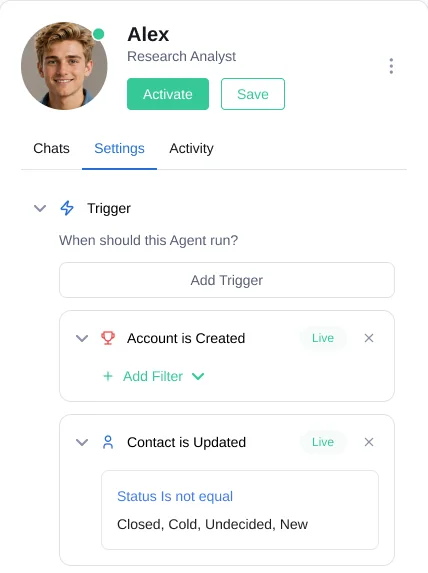
Add triggers so the agent runs on its own. Narrow each trigger with filters so it only runs on the records that matter.
- When a record is created
- When a record is updated, with field filters
- On a fixed schedule
Give it the right knowledge
Upload files or point the agent to a website. Fireberry scans the pages and you choose what to sync.
- Uploaded files
- Websites and help centers, page by page
- Records from your Fireberry objects Coming soon
Let it act
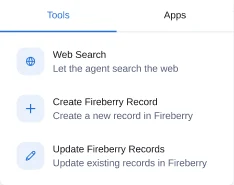
Choose which tools the agent can use. It can search the web and write the results straight into Fireberry.
- Web search
- Create records in Fireberry
- Update existing records in Fireberry
What the agent does
Agents your team can turn on this week
Revenue operations agent
Spots stuck deals, flags missing CRM data and drafts follow-ups for account owners.
Lead research analyst
Researches every new account on the web and fills in the company details.
Daily service summary
Every morning, summarizes open tickets and highlights the urgent ones.
AI agents FAQ
Agents only use the tools you give them. Without the create and update tools, an agent can read and answer but not change records.
Chat with the agent in its settings screen and check the preview of its work. Turn it on only when the result fits.
Yes. Upload files or sync pages from your website as the agent's knowledge.
Yes. Add a fixed-time trigger to run it on a schedule.